
Docker sniffing made easy
An application in a Docker container needs to communicate in encrypted form, and it must be ensured that the encryption is successful. How do you proceed?
That was precisely my task in a previous project. I was asked to perform a penetration test in one of our projects and had to put the encrypted communication of a Docker container to the test. Even outside of a penetration test, it can be helpful in software development to check the encrypted communication of an application running in Docker.
What penetration testing has (or can have) to do with Docker
It goes without saying that software should be secure and function without failures. Unsurprisingly, cybersecurity is a fundamental component of today’s software development.
When it comes to cybersecurity, penetration testing is not far behind. Penetration testing simulates hacker attacks by deliberately attacking and stressing a system from the outside in order to identify vulnerabilities and security issues. [1] To do this, the system being tested (SUT for short: ‘system under test’) runs on a specially prepared test environment. This environment must be isolated so that attacks carried out as part of the penetration test cannot cause any damage outside the system.
In my case, the SUT included communication with a server via TLS TCP/IP. One of the goals of the penetration test was to use sniffing attacks to find out whether the server’s communication was successfully encrypted.
A sniffing attack attempts to read the content of the communication between two communicating parties. Encrypting the communication does not prevent sniffing attacks, but they are then unsuccessful because the transmitted information can only be understood by the recipient and attackers cannot do anything with it.
In the production environment, the server should be hosted on the web. In order to avoid having to extend the isolation of my SUT to the web, I decided to host the server locally only. This is where Docker comes in. [2] Docker enables the platform-independent and isolated deployment of applications with little effort. An application is executed in a Docker container, which acts as the environment for the application.
Docker now plays a major role in software development because a wide variety of applications can be started and managed locally during development. Since the development team was already hosting the server to be tested in Docker, I also decided to host the server in a Docker container so that my SUT did not include a server hosted on the web.
The toolbox for Docker traffic analysis
Now I needed a way to read the network traffic of the Docker container. A quick search revealed that this could be done with a combination of Wireshark [3] and Edgeshark [4] and the associated cshargextcap [5].
Wireshark is used to analyse network communication between two communicating parties. In addition, various so-called ‘Extcaps’ (‘Capturing Extension’) can be integrated into Wireshark. These are external mini-programmes that complement the functionality of Wireshark.
Edgeshark is a tool for analysing Docker containers. It runs in two Docker containers itself and offers a web interface on which various data about other existing Docker containers is displayed.
cshargextcap (‘Containershark Extcap Plugin for Wireshark’) is an Extcap that enables Wireshark and Edgeshark to work together.
Let me demonstrate the interaction of these three tools here. To do this, I’ll modify my SUT a little.
Two small Python scripts are used as clients: a TLS-TCP client that communicates with a server in encrypted form via TLS TCP/IP, and a TCP client that communicates in unencrypted form via TCP/IP. Accordingly, I host two echo servers in Docker that send incoming messages back like an echo: a TLS-TCP server and a TCP server. This gives me an unencrypted and an encrypted TCP channel. The information transmitted by both channels can be intercepted by Edgeshark, which also runs in Docker, and transmitted to cshargextcap. My test environment with the SUT and the three testing tools now looks like this:
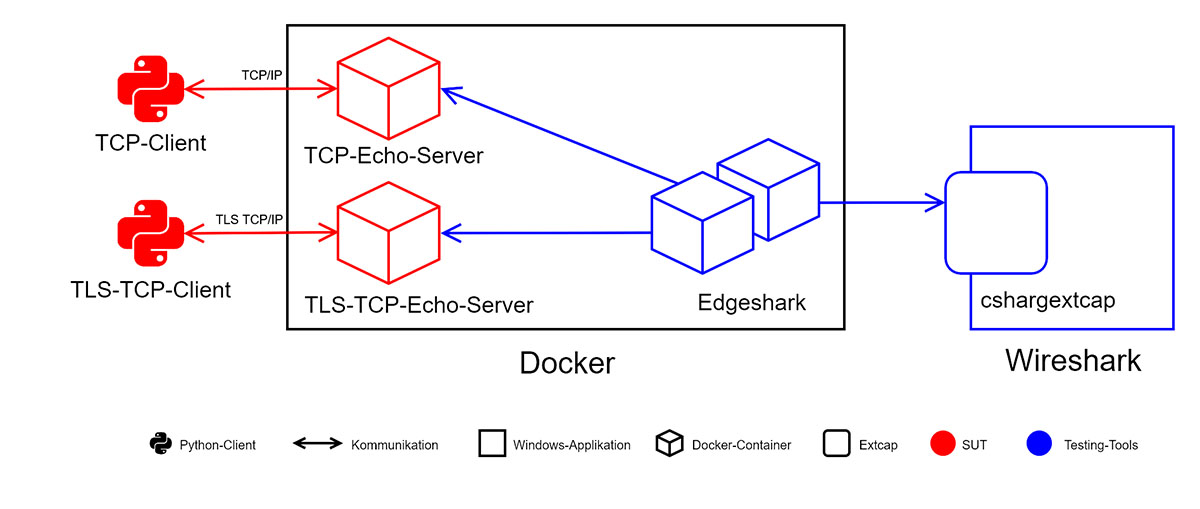
Figure 1: Toolbox for Docker traffic analysis
Network sniffing in practice
Back to the tools. Edgeshark can be installed on Windows with just one command, while Wireshark and cshargextcap can be installed with a quick process in the respective installer. Immediately after installation, Edgeshark is ready to use and cshargextcap is available in Wireshark. Now all that remains is to establish the connection between Wireshark and Edgeshark.
When opening Wireshark, the ‘Docker host capture’ interface immediately catches the eye. This is the link to Edgeshark and enables container communication to be captured in Wireshark. By clicking on the cogwheel, I configure http://localhost:5001 as the Docker host URL, because this is where the Edgeshark container runs. In the ‘Containers’ drop-down menu, I can select the container whose communication is to be recorded; I first select the TCP server here so that I can read the unencrypted TCP communication.
Now I start recording in Wireshark and have the TCP client send the message ‘Hello World!’, to which the TCP server responds with ‘Hello World!’. Various messages exchanged between the client and server within the TCP immediately appear in Wireshark:
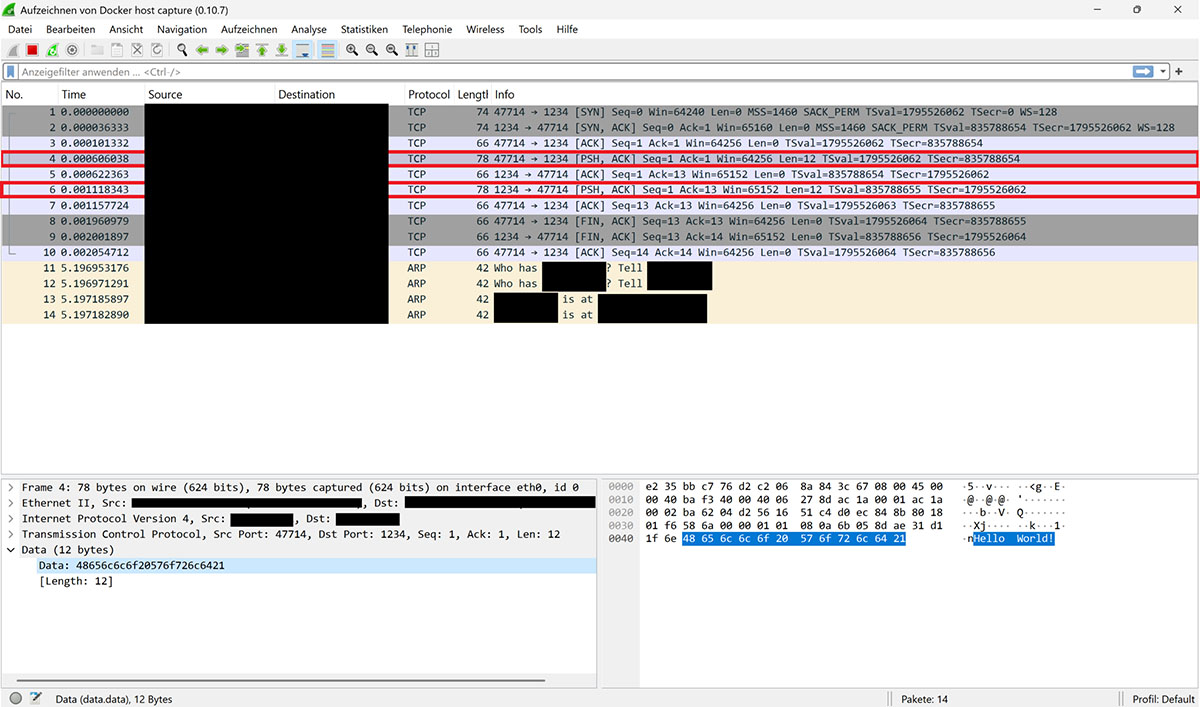
Figure 2: Recording in Wireshark with ‘Hello World’
Two messages show the transmitted content ‘Hello World!’. The ports of the sender and recipient are specified at the beginning of the information in the ‘Info’ column. The first marked message was sent to port 1234, while the second originated from this port. The first message was therefore sent from the client to the server, while the second is the server’s response.
It is therefore clear that the communication is unencrypted and that the content of sent messages can be read.
Now I select the TLS-TCP server in the interface configuration so that I can record the TLS-TCP communication. If the same message is now transmitted, but this time from the TLS-TCP client to the TLS-TCP server, the transmitted text ‘Hello World!’ cannot be found in any of the messages in Wireshark:
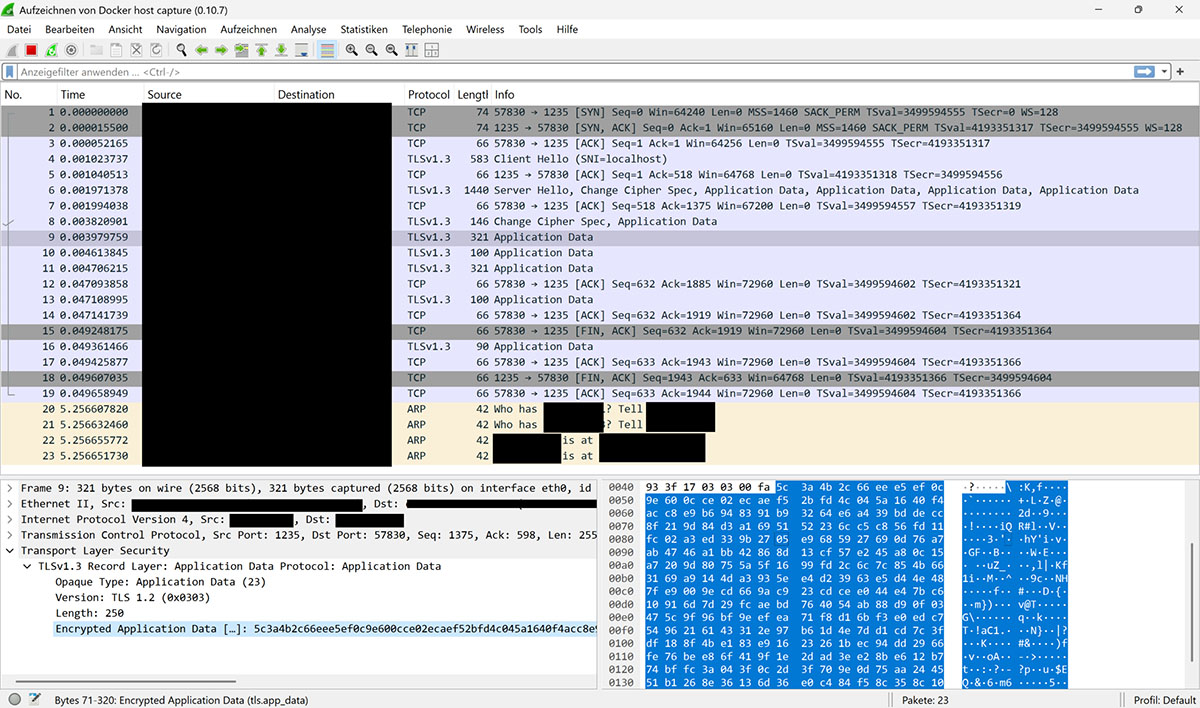
Figure 3: Message transmission without ‘Hello World’
Only the fact that information has been transferred and that it is encrypted is visible; the content remains hidden.
Making encrypted communication transparent
I can go one step further in my attack scenario: if I provide Wireshark with the secrets used for encryption, the programme is able to decrypt the TLS encryption.
To do this, I specify any path to a file in the SSLKEYLOGFILE environment variable. As a result, many TLS libraries automatically write the secret used for encryption to this file. This also applies to the Python library used for encryption in the TLS TCP client script. I now store the path to the file in Wireshark in the settings for the TLS protocol so that the secret can be used for decryption.
If the TLS-TCP communication is now recorded again, Wireshark is able to display the transmitted message in plain text this time:
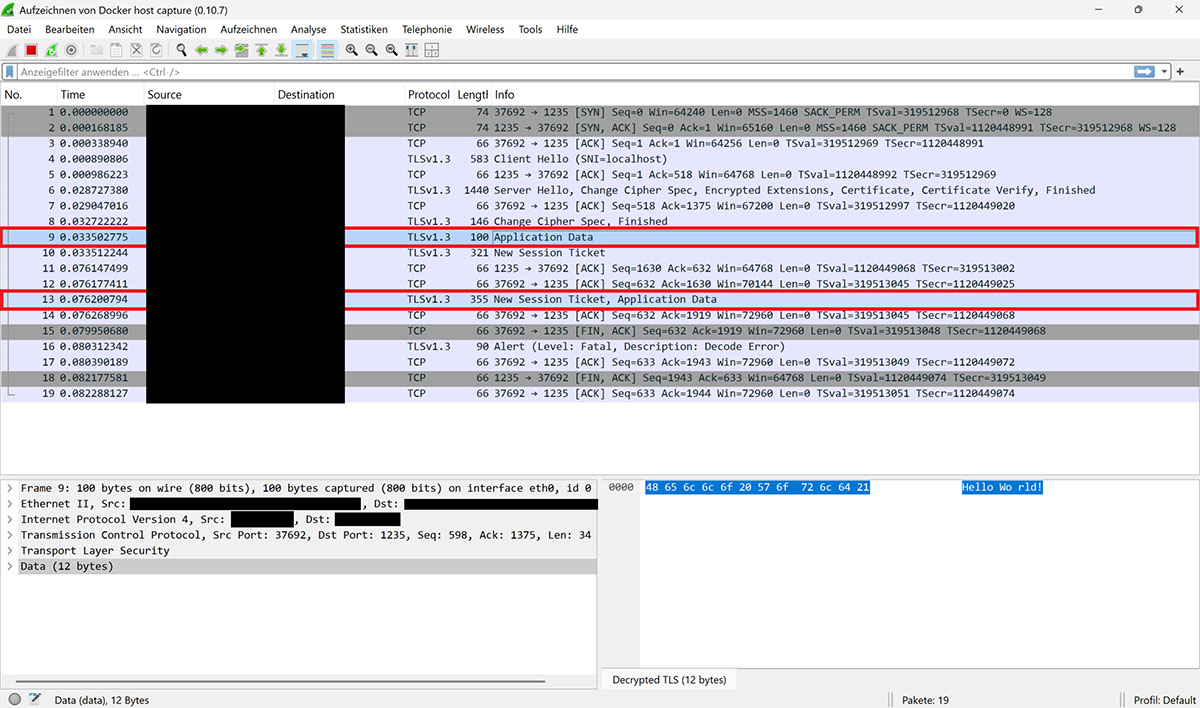
Figure 4: Clear text messaging
The text ‘Hello World!’ can be seen in both marked messages. This means that the decryption was successful.
Conclusion
The combination of Wireshark, Edgeshark and cshargextcap tools allows you to read the communications of a Docker container. All tools can be installed quickly and configuration is also very easy. Wireshark can then be used to read the incoming and outgoing communications of a Docker container. It is also possible to decrypt encrypted communications if the encryption secrets are provided.
This can be very helpful for development purposes or as part of a penetration test. This allowed me to verify the encryption of the server in Docker in the customer project and successfully carry out my penetration test.
Notes:
[1] When dealing with computers, programmes, networks or websites, a hacker is often a person who explores the limits and mechanisms of a technology. Although there is no such thing as a typical hacker, three types are usually distinguished:
- A black hat hacker is a person who acts with criminal intent.
- A white hat hacker is a person who penetrates a system or network but does not cause any damage. What may sound a little strange at first glance makes sense when this person is acting on behalf of the system or network operator.
- With a grey-hat hacker, it is not possible to directly determine the intention behind the attack on a system, network or website. In some cases, the people involved are interested in publishing ‘secret’ data in order to draw public attention to abuses. In other cases, it is a matter of blackmail with the aim of persuading organisations to take certain actions. Grey is neither white nor black; grey is grey.
[2] Docker
[3] Wireshark
[4] Edgeshark
[5] cshargextcap
Here you will find an article about integration test first with Gherkin and Docker.
Would you like to discuss Docker sniffing as an opinion leader or communicator? Then feel free to share the article in your network.
Here you will find more articles from the t2informatik Blog:

Generating unit tests with AI

Creating applications with Avalonia UI

How effective are AI-supported code reviews really?

Marco Menzel
Marco Menzel is a junior software developer at t2informatik. He discovered his enthusiasm for computers and software development at an early age. He wrote his first small programmes while still at school, and it quickly became clear that he wanted to pursue his hobby professionally later on. Consequently, he studied computer science at the BTU Cottbus-Senftenberg, where he systematically deepened his knowledge and gained practical experience in various projects. Today, he applies this knowledge in his daily work, combining his passion with his profession.
In the t2informatik Blog, we publish articles for people in organisations. For these people, we develop and modernise software. Pragmatic. ✔️ Personal. ✔️ Professional. ✔️ Click here to find out more.