
Using n8n for automated job search
Expand the table of contents
The task: Automatically checking career websites
Version 1: No code & low code
Interim conclusion: For developers, this quickly starts to feel cumbersome
Version 2: Multiple workflows instead of one large workflow
Conclusion: n8n is powerful, but not a substitute for software architecture
How a simple automation task turned into a complex workflow project
“n8n automates my life.” That sounds like a promise I’d like to put to the test. And I’ve got the perfect use case: job hunting.
Hardly anything is as tedious as constantly trawling through job portals. Sometimes they return too few results, sometimes too many irrelevant ones, and sometimes banners and filters block my view of what’s important. So I ask myself a simple question: if exciting roles don’t end up exclusively with headhunters, but are often posted directly on companies’ careers pages, why don’t I look exactly there?
The conclusion is obvious: I’m building an automation tool. With n8n. Not out of necessity, but out of… well, strategic laziness.
What is n8n?
n8n, pronounced ‘n-eight-n’, is an automation platform with a node-based editor. This means that workflows are not created as traditional programme code, but from individual building blocks that are linked together. [1]
You can host n8n yourself or have it hosted by providers such as IONOS or Strato. As n8n is also available as a Docker container, the platform can be set up quickly. All you need is a free licence, which you can obtain by providing an email address.
At first glance, n8n is a low-code platform with a graphical user interface. What makes n8n truly exciting, however, is its wide range of integrations. These include, amongst others:
- Communication: Telegram, Slack, Discord, Microsoft Teams
- Email: Gmail, SMTP, Mailchimp
- Task management: Trello, Todoist, Jira
- Databases: MongoDB, MySQL, Redis
- Social media: YouTube, X, Facebook
- AI models and agents: OpenAI, Claude and other providers
There are also many other services that I’d never heard of before. The strength of n8n lies not only in the sheer number of integrations, but in the way these services are linked: individual tools are combined to create automated workflows.
The task: Automatically checking career websites
I have a list of companies I can envisage working for. I know the website for each one. I’d like to have these websites checked automatically.
The aim is to get a quick response: Is the company currently recruiting software developers? The workflow should run daily so that I can spot suitable vacancies early on, without having to constantly search through career pages myself.
First, I’ll set up n8n as a Docker container:
docker run -it --rm --name n8n -p 5678:5678 -v n8n_data:/home/node/.n8n n8nio/n8n
As I’ve had very little experience with low-code and no-code platforms [2] so far, I’m jumping on the current ‘vibe-coding’ trend: I’m getting help from various chatbots. Sometimes it’s Mistral, sometimes Claude, sometimes ChatGPT. I use whichever one is most helpful in the situation at hand. [3]
The planned process is simple to begin with:
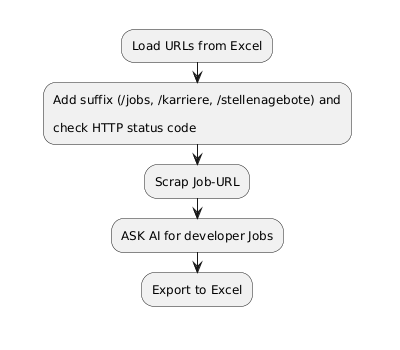
- A company website is loading.
- The workflow searches for a suitable careers or jobs page.
- This page is analysed.
- An AI model checks whether any developer roles are advertised there.
- The result is saved.
Obviously, this approach won’t find every vacancy, as not all companies post their jobs where you’d expect them to. Furthermore, some sites require manual search queries, whilst others provide unclear content or block automated requests.
However, a random sample shows that the approach yields enough hits to justify continuing. With more than 2,000 companies on my list, the workflow doesn’t need to be perfect. It just needs to provide enough relevant leads.
I use Jina AI to scrape the websites. [4] I use Claude Console to analyse the website content. [5]
Version 1: No code & low code
In the first version, I want to handle as much as possible using n8n’s UI nodes. The workflow is intended to run through the individual URLs using a Loop node, generate potential job URL candidates from them, and then use an HTTP node to check whether these pages are accessible.
At first glance, the approach seems simple. In practice, however, the workflow only runs smoothly with the first URL. A query to my chatbot brings the first reality check: nested loops are not supported. The n8n Docs AI confirms this later and recommends sub-workflows, data structures that are as flat as possible, or reset options instead.
I don’t really like any of these options. So I scrap the purely no-code approach.
Instead, I move the search for the relevant job URL into a code node. This checks several potential job URL candidates for each company page and returns the most suitable one. The job webpage found is then scraped using jina.ai. The result is sent to the Claude Console with the question of whether any developer jobs are available.
The process still sounds simple. However, it quickly becomes apparent that even this seemingly minor process requires significantly more supporting logic than expected.
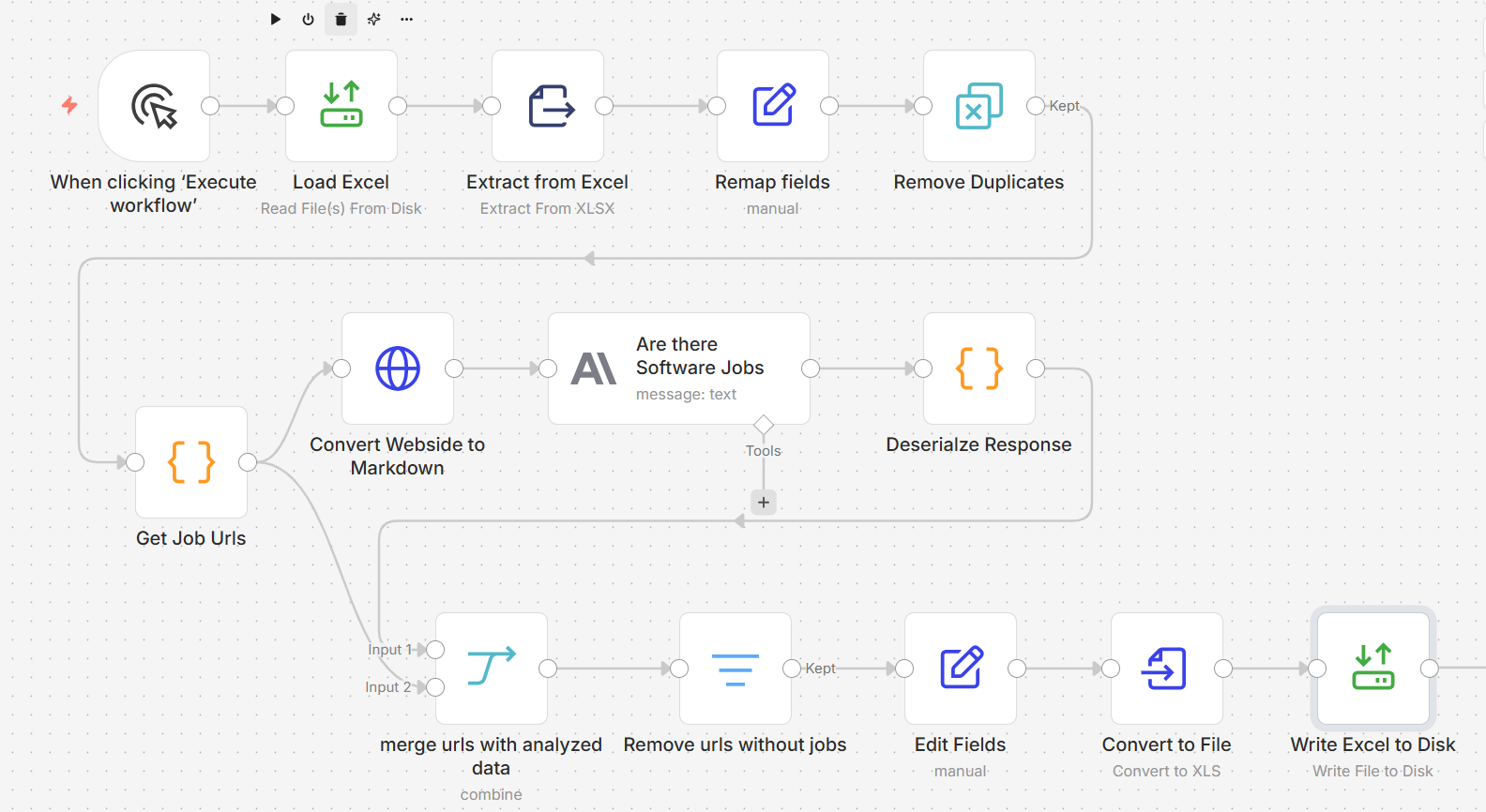
Abbildung: All-in-one job search
- No job URL can be found for a given URL.
- The workflow hits a limit on the free version of jina.ai.
- Claude Console reports a 529 overload error, despite having a paid account.
As soon as one of these errors occurs, the workflow aborts. Restarting means starting from the beginning again. All previous intermediate results are lost, have to be generated anew and consume tokens once more.
At this point, it becomes clear: the automation works in principle. But it is not yet robust.
Interim conclusion: For developers, this quickly starts to feel cumbersome
Many of the problems encountered so far can be resolved. I can incorporate additional paths for error handling, add delays, take API limits into account and define retries.
At this stage, I’ve already spent two days working on n8n and am beginning to take a critical look at the result. Essentially, the workflow does nothing more than:
- load data from Excel,
- query two APIs in two loops, and
- save the data back to Excel.
With the right NuGet packages, I can achieve the same thing in C# much more quickly. I’m then working in a fully-fledged IDE, have debugging capabilities, can easily save intermediate results and test the code in a targeted manner.
Another advantage: my IDE already has a chatbot built in. I don’t have to describe my problems in detail because the chatbot can see my code and help directly within the context.
As a software developer, I’m disappointed at this point and actually want to abandon the project.
A few days later, however, I ask myself a different question: am I perhaps approaching the problem the wrong way?
In C#, I wouldn’t write everything into a single class. There would be components for the import, for the API connection, for the export and for the logic that brings everything together.
So I turn to the chatbots once more. This time, I ask Mistral, Claude and ChatGPT in parallel to better contextualise the answers. My problem is clear: Despite the low-code approach, the workflow quickly becomes large and confusing as soon as I incorporate error handling, data preparation and retries. Furthermore, there’s no built-in ‘Pause’ and ‘Continue’ functionality, even though many parts could actually run in parallel.
The answers all point in the same direction:
Workflows shouldn’t become large. You shouldn’t use them for traditional programming, but rather to orchestrate subtasks.
This changes my perspective on n8n.
Version 2: Multiple workflows instead of one large workflow
One option is to offload parts of the workflow. For example, the import from Excel can be moved to a sub-workflow. This sub-workflow defines which data it receives and which data it returns. This makes the main workflow smaller and easier to read.
However, for my specific use case, that alone is not enough. I want more than just a tidier workflow. Three points are particularly important to me:
- Pause and Continue: Data that has already been processed should not be processed again.
- Interim results: I want to see which data is already available, partly so that I can make targeted adjustments to the workflow in the event of errors.
- Parallelisation: As soon as a job URL is found, scraping and analysis should be able to continue whilst the search for the next job URL runs in parallel.
That is why I am splitting the workflow into five smaller workflows:
- Import and preparation of data,
- Determine job URL,
- Scrape job website with jina.ai,
- Analyse job website with Claude Console, and
- Export results.
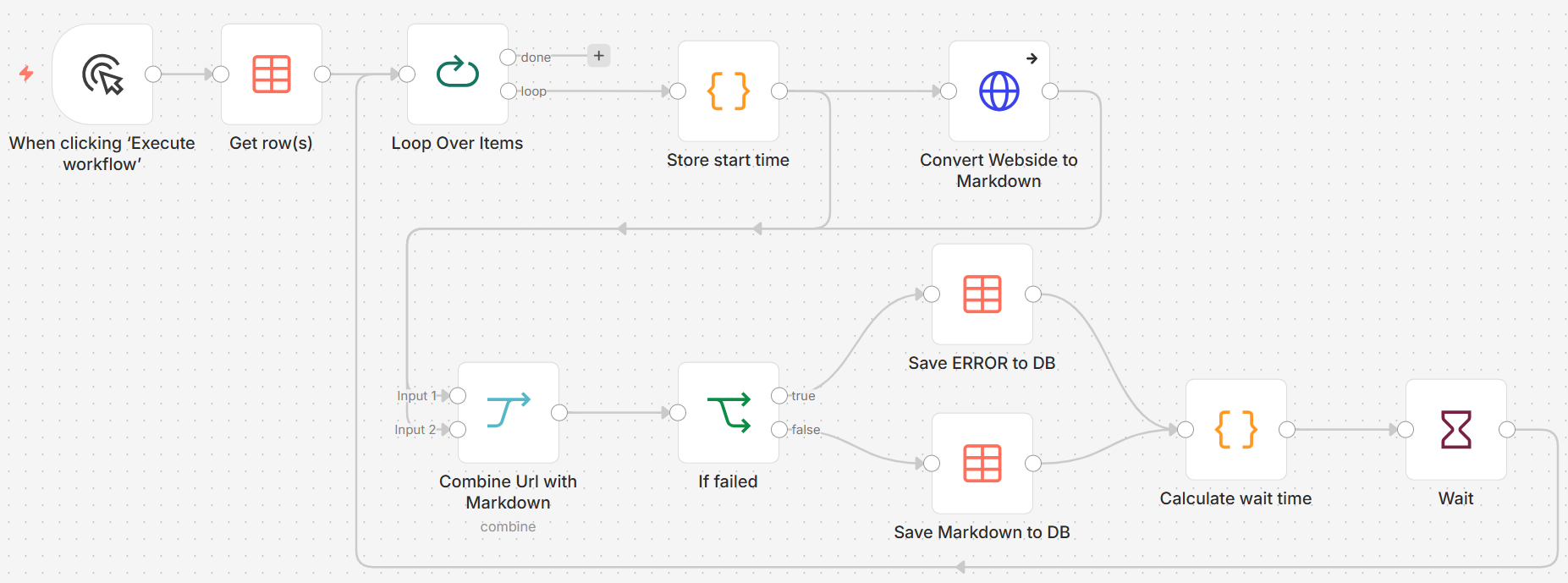
Abbildung: Scrap website with Jina AI
For data exchange, I use a Data Table in n8n. This is a lightweight database table within n8n. It can be read from and written to via dedicated Data Table nodes. SQL scripts are not required for this. Instead, you use the standard CRUD operations directly via the n8n nodes.
By default, storage space for all tables is limited to 50 MB. This is sufficient for my use case. If necessary, the limit can be adjusted via environment variables. One restriction remains: in the web UI, longer strings can only be displayed up to an unspecified limit.
It is important to clearly separate responsibilities. The workflows do not write to the same columns. Each workflow only populates the fields for which it is responsible. This way, I avoid conflicts between workflows running in parallel.
The result is significantly more stable than the first version. Whilst one workflow continuously searches for job URLs, another can already be scraping web pages. A further workflow analyses the content using Claude Console. Each workflow has only one small task. This also keeps error handling, retries and rate limits manageable.
The interim results are visible at all times and are retained even after a restart of the n8n instance.
One issue remains unresolved: my solution does not yet feature true orchestration. I currently start the workflows manually and have not yet found an elegant way for them to communicate with one another. At this stage, I cannot yet assess whether n8n offers suitable functions for this, whether I am misunderstanding them, or whether I simply lack experience.
Conclusion: n8n is powerful, but no substitute for software architecture
Based on my initial experiences, I can well understand why n8n is attracting so much attention at the moment. The tool makes automation accessible to a much wider audience. People without a background in programming, in particular, can use it to build workflows that, just a few years ago, were the preserve of professional developers. When combined with chatbots and modern AI models, surprisingly powerful automations can be created very quickly.
At the same time, the initial enthusiasm is tempered as soon as the workflow becomes more complex. Then it’s no longer just a matter of connecting a few systems together. It’s about error handling, intermediate results, data models, traceability and maintainability.
I view quality assurance as particularly critical. It is not yet clear to me how concepts such as test-driven development can be meaningfully applied to n8n workflows. I also lack convenient testing options for logic or code nodes, such as those I am familiar with from established development environments. This quickly gives rise to a risk: whilst automations may work, they remain difficult to test, difficult to trace and, in the long term, difficult to maintain.
What I find interesting is that most of the problems in this experiment do not lie with the AI. Given a consistent model, it delivers surprisingly stable responses. The real difficulties arise at the interfaces with the outside world: websites return incorrect status codes, careers sections are located at unexpected URLs or are missing altogether, and occasional overloads of AI services create additional sources of error.
The AI integration itself also appears deliberately limited in some areas, such as when directly reading and processing website content. I cannot judge whether this is due to technical, legal or product strategy reasons. Nevertheless, it does play a role in practical work.
Ultimately, the impression is mixed. n8n makes automation and AI significantly more accessible. That is a major benefit. At the same time, I wonder how many of the projects being launched today can be maintained and further developed in the long term. The barrier to entry is low. The real challenge begins afterwards: with maintainability, transparency and quality assurance.
Notes:
[1] n8n – AI agents and workflows you can see and control
[2] What is low-code development and what is no-code-development?
[3] How does vibe coding work?
[4] Jina AI – Your Search Foundation supercharged
[5] Claude Console
Does your existing software architecture need modernising? If so, tell us about your project or, alternatively, download the t2informatik Snapshot.
Would you, as an influencer or communicator, like to discuss n8n and this case study? If so, please feel free to share this post within your network.
David Stoermer has published another article on the t2informatik Blog:

HL7 or FHIR: A guide to help you decide

David Stoermer
David Störmer is a software developer and architect with a passion for clean code and test-driven development (TDD). His interest in programming was sparked at an early age: at 15, he discovered a book on QBasic in the library and used it to produce his first sounds on his parents’ Windows 95 computer – a formative experience.
While studying media informatics, he specialized in computer vision and visualization technologies, but always kept his focus on maintainable, clearly structured code. TDD became second nature to him: “Even the most beautiful code is useless if what it’s supposed to do isn’t documented.”
In his personal life, David balances family outings to Karls Erdbeerhof with projects like home automation or renovating his own home, always with the goal of meaningfully integrating technology into everyday life.
On the t2informatik blog, we share knowledge and experience with people in organisations. And it is for precisely these people that we have been developing and modernising software since 2012. Pragmatically. ✔️ Personal. ✔️ Professional. ✔️ Get to know t2informatik as your development partner.