
What is Kanban Light?
Table of Contents: Definition – How does it work? – Differentiation – Implementation – Tools – Advantages and disadvantages – Questions from the field – Notes
Kanban Light – tackling tasks in a streamlined and transparent way
A project has been running for a few weeks, and the list of outstanding tasks has grown without anyone noticing. Some of them are listed in a spreadsheet, whilst the rest are scattered across emails and personal notes. At the weekly meeting, someone asks what the team is actually working on at the moment and receives five different answers.
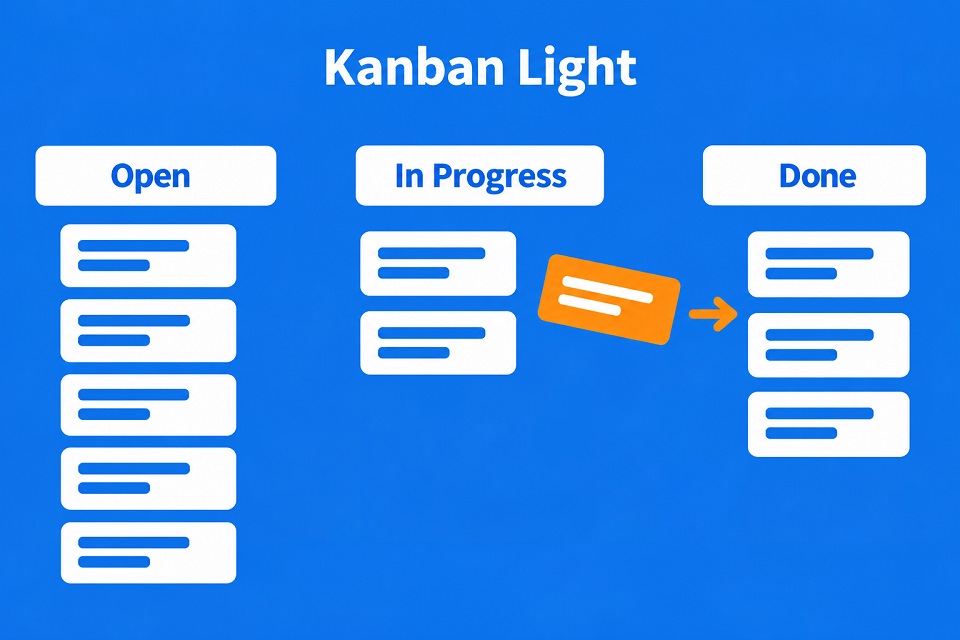
Kanban Light is designed precisely for situations like this. The term refers to a deliberately simplified version of Kanban that focuses entirely on the board. Each task in a project is assigned its own card, such as a flipchart card or a sticky note. The cards are pinned to a noticeboard, a whiteboard or displayed in a digital tool divided into columns. The column in which a card is located indicates its status. At least three columns are required: ‘Open’ for tasks that nobody has started yet, ‘In Progress’ for everything currently underway, and ‘Done’ for completed tasks.
The principle originates from the automotive industry. The Japanese word ‘kanban’ literally means ‘sign’ or ‘board’. At Toyota, it referred to a card attached to containers of components, indicating what needed to be replenished. The system was developed by the engineer Taiichi Ohno. He took his inspiration from American supermarkets, where only the shelf from which an item has been taken is restocked. In 1953, Toyota first applied this logic to machine production at its main plant, and then across the entire company in the early 1960s. [1]
In the mid-2000s, David J. Anderson adapted the idea for software development. This gave rise to the so-called Kanban method, a standalone approach with established practices for managing knowledge work. [2] Kanban Light takes the most visible part of this – the board with its cards and columns. The suffix ‘Light’ serves to distinguish this simplified form from the full method. Today, it is found in agile teams as well as in projects that combine agile and traditional elements.
How does Kanban Light work?
The basic principle fits on an index card. Four key elements determine whether the board proves useful in day-to-day work or ends up gathering dust after three weeks:
The cards: Each card represents exactly one task. It’s best to use a title that describes the activity itself – for example, ‘Anonymise test data’ rather than just ‘Test data’. The name of the person responsible is added as soon as someone takes on the task. Larger requirements, such as a user story, are broken down into several cards.
The columns: The three basic columns – ‘Open’, ‘In Progress’ and ‘Done’ – are sufficient to start with. As needs grow, further columns can be added for thematic stages such as ‘Review’ or ‘Waiting for …’, or for time-based categories such as ‘This week’ and ‘Today’. In addition, horizontal lines – known as swimlanes – can be drawn, for example one per person or per subject area. It is only worth expanding the board once a gap is actually noticed.
The Acceptance criteria: When can a card be moved to ‘Done’? Without a shared understanding, each person will interpret this differently. That is why the team agrees on acceptance criteria, similar to the ‘Definition of Done’ in Scrum. These apply either to all cards or are defined on a per-card basis as required. It is important that they are set out in writing and that everyone involved is familiar with them.
The regular meeting: At the heart of the process is a short, recurring meeting at the board, often called a Kanban review. Each person gives a brief update on their cards; the team moves them together and records any additional tasks or problems that have arisen on separate cards. Each of these is given a name. The meeting should take place at least once a week; in the first few weeks, twice a week is preferable. As a guideline, allow five to seven minutes per team member. For small tasks, a daily session is also possible, for example as a morning meeting or during the Daily Scrum.
Cards, columns, criteria and the meeting are interdependent. If any of these elements is missing, the board quickly loses its meaningfulness.
Kanban Light compared: how it differs from related approaches
Many teams are familiar with a board and cards from other contexts. Three comparisons help to clearly define Kanban Light:
How does Kanban Light differ from the Kanban method?
The Kanban method according to Anderson is designed to manage a team’s workflow. A key element is what are known as WIP limits, where WIP stands for ‘Work in Progress’. These are upper limits on the number of tasks that may be in a column at any one time. Once the limit is reached, the team does not start anything new until a current task is complete. This ‘pulling’ of work is known as the pull principle. In addition, there are key metrics such as lead time, as well as regular review sessions during which the team refines its processes.
Kanban Light does not include these control elements. It shows the status of the work, but does not limit quantities or measure lead times. The Kanban method aims to improve the work system step by step, whilst Kanban Light provides an overview of the work in progress.
How does Kanban Light differ from a Scrum task board?
Scrum is a framework in which a team works in sprints, i.e. fixed time periods of no more than one month. It defines clear responsibilities and recurring deadlines. Many Scrum teams visualise the tasks of a sprint on a task board that looks strikingly similar to a Kanban Light board.
The difference lies in the rhythm. A task board is repopulated at the start of each sprint and cleared once the sprint ends. A Kanban Light board, on the other hand, accompanies a project throughout its duration, with new cards being added at any time. Kanban Light does not recognise roles in the Scrum sense. The only role that should be explicitly assigned is that of facilitating the regular meetings.
How does Kanban Light differ from a bar chart?
A Gantt chart displays tasks as bars on a timeline. It shows the duration and dependencies of individual tasks and is well suited to planning entire projects. The key question here is: When does what happen? Kanban Light answers a different question, namely: What is the current status of each task?
The two approaches therefore complement each other well. Often, the bar chart provides the rough timeframe for a project, whilst Kanban Light manages the work within the current phase.
Kanban Light is thus the leanest of the approaches considered here. It focuses on providing an overview and can be supplemented with elements from the other approaches as soon as more control is required.
Implementing Kanban Light step by step
How does a team move from a blank whiteboard to a live board? Seven steps have proven effective; their order can be adapted:
1. Clarify the goal
Based on the project brief, formulate in a single sentence what the team is working towards, and display this sentence above the board. An unclear goal almost inevitably leads to cards that miss the mark.
2. Set up the board
Define the columns and choose a location, ideally a dedicated project room. In shared spaces, a mobile noticeboard is suitable. The columns containing work in progress require the most space, as this is where people spend most of their time reading. If space is limited, completed cards may be hung so that they overlap.
3. Agree on acceptance criteria
Set out the criteria in writing. Also clarify where the status will be documented and what reporting channels your organisation specifies.
4. Prepare the first cards
Write down the tasks that are already known in advance. If the team is to allocate the tasks themselves, leave the name field blank. Anyone who signs up straight away should take care not to secure only the most straightforward tasks for themselves. Experience shows that this sort of behaviour is immediately noticeable at the first joint meeting.
5. Set up regular meetings
Invite all participants to a series of meetings, ideally always at the same place and at the same time. The invitation should state the objective and refer to the acceptance criteria; for a digital board, it should also include access details. For the first meeting, allow an extra 30 minutes or so to explain the method.
6. Hold the kick-off
Only pin the prepared cards during the meeting, together with the team. New tasks go into ‘Open’; a name is optional at this stage. Ongoing tasks go into ‘In Progress’ and must be assigned to a responsible person by this point at the latest. Tasks that have already been completed elsewhere go straight into ‘Done’. These are also given a name, as someone must check whether the acceptance criteria have been met. If anything is missing, a new card is created in ‘Open’. The team then adds further cards; completeness is not essential at this stage. The facilitator records the status in the agreed format.
7. Manage and conclude
After the kick-off, the regular meetings take over the day-to-day management. By the end of the project, the “Open” and “In Progress” columns should ideally be completely empty. A joint review of the “Done” column concludes the project.
The most time-consuming part is usually the preparation. Once the first regular meetings are underway, the team gets into its stride, and the meetings can often be shortened.
Examples of Kanban Light
What does this look like in practice? The following scenarios illustrate the various ways in which the board can be used:
Release preparation: A six-person development team is preparing the next release of a web application; there are three weeks left until the deadline. Cards such as ‘Draft release notes’ or ‘Check database migration on the staging environment’ are pinned to the board.
As there is a lot going on during this phase, the team meets every morning for a quarter of an hour at the board. On the third day, the ‘Open’ column fills up much faster than planned, as new bugs emerge during testing. Each bug is assigned its own card. During the morning meeting, the team decides which of these must be fixed before the release and which can wait.
Replacing a legacy system: A medium-sized company is replacing its in-house order management system with a new solution. In addition to the in-house IT and business departments, an external service provider is involved, connected remotely. The team therefore uses a digital board with one swimlane per sub-project, for example for data migration and training.
As many tasks depend on decisions made by the business department, there is an additional ‘Awaiting Approval’ column. At the regular weekly meeting, it is immediately clear how many cards are currently awaiting approval.
Audit under time pressure: Four weeks before an external security audit, an IT team realises that several pieces of supporting documentation are missing. In the space of an afternoon, a board is created on which the ‘Pending’ column is split into ‘Next week’ and ‘This week’. Each missing document becomes a card, such as ‘Update password policy’ or ‘Test and log recovery from backup’. The team meets twice a week. Ultimately, the ‘Done’ column serves as an outline for the documentation folder.
What these scenarios have in common is a clearly defined timeframe with many small tasks. It is under these conditions that Kanban Light is most effective.
Analogue or digital: tools for Kanban Light
Does it have to be the classic pinboard? The choice depends primarily on how a team works together.
The analogue board is constantly visible in the room and encourages people to get up during meetings and pick up cards. If a team works across multiple locations or from home, there’s hardly any way round using a digital solution. Regular meetings then take place via video conference.
Common tools include Jira, Trello, GitHub Projects, Azure Boards and Microsoft Planner. They record the history of each card and can be accessed from anywhere. For development teams, there is an additional advantage: cards can be linked directly to tickets, commits or pull requests. Often, the board has long since existed within the issue tracker. Kanban Light is then primarily a matter of clearly defined columns and a reliable regular meeting.
A word of caution: digital tools can tempt you to overload every card with fields, labels and sub-statuses. This leads to the loss of precisely the simplicity that gives the method its name. Licences and data protection issues should also be clarified with the IT department in advance.
Advantages and disadvantages of Kanban Light
As simple as the method is, its limitations are equally clear. It’s worth taking a look at both sides.
Advantages:
- Quick to get started: For the analogue version, all you need is a noticeboard and a stack of cards. Even people with no project management experience can understand the board straight away. However, facilitating the process does require a bit of practice to ensure meetings remain short and focused.
- Problems are spotted earlier: A card that remains stationary across several meetings is a clear warning sign. The regular meeting provides a fixed opportunity to discuss this before things get tight. This shortens the turnaround time for individual tasks.
- Greater team involvement: People who write and move a card themselves usually feel more responsible for the task than they would for a bar on a plan maintained by someone else.
- Status without extra reports: If the board is displayed in an easily accessible place, stakeholders can also get an idea of the situation for themselves. This can make some status meetings shorter or even unnecessary.
Disadvantages:
- The board is only as good as its maintenance: if nobody updates the cards, it shows an out-of-date status. This is more treacherous than having no overview at all, because it conveys a false sense of security. The method therefore requires discipline from everyone involved.
- Invisible work remains invisible: Tasks completed on the side or follow-up work that nobody notes down do not appear on the board. The actual workload is then underestimated.
- Overload is not curbed: Without an upper limit, any number of cards can accumulate in ‘In Progress’. Whilst the board shows every single task, it does not warn that the team is getting bogged down.
- Limited traceability: An analogue board is a snapshot; changes leave no trace. Where there are strict documentation requirements, such as in regulated sectors like medical technology, additional logs or a digital tool with a change history are needed.
All in all, the benefits become apparent quickly and with little effort. Most of the drawbacks can be mitigated with clear rules and a bit of discipline. It becomes particularly challenging where traceability or active workload management is required.
Questions from the field
Here you will find some questions and answers from practice:
How comprehensive should a task on a card be?
What happens to tasks that are blocked?
Can Kanban Light be combined with Scrum?
Yes, that is certainly possible. Particularly in hybrid projects, a Scrum team develops the software in sprints, whilst supporting tasks such as training or preparing for the roll-out are managed on a Kanban Light board. Anyone wishing to permanently combine elements of both approaches into a single, integrated process will find Scrumban to be a well-established model. It combines the planning elements of Scrum with the flow control of Kanban.
Does Kanban Light also work for a single person?
It certainly does as a board for your own tasks. Jim Benson and Tonianne DeMaria Barry popularised this approach under the name Personal Kanban, although it already included an upper limit on the number of tasks that can be worked on simultaneously. The very essence of Kanban Light – coordinating with others at regular meetings – naturally doesn’t apply when there’s only one person. What remains is a well-organised, visible to-do list.
When is it worth making the switch to the full Kanban method?
Typical indicators include a ‘In Progress’ column that is consistently overloaded, or the desire to forecast delivery dates reliably. In such cases, it may be useful to start by measuring how long it takes for cards to move from ‘Open’ to ‘Done’. In the next step, the team sets an initial WIP limit, ideally just below the number of cards that are typically in progress at any one time. The remaining elements can be added gradually.
Impulse to discuss:
Should the initiative to use Kanban come from the team itself, or is it more effective if management introduces this method?
Notes:
If you like this post or would like to discuss it, please feel free to share it within your network or in your organisation.
[1] Ohno, Taiichi: Toyota Production System. Beyond Large-Scale Production. Productivity Press, Cambridge (MA) 1988. The original Japanese edition was published in 1978. In it, Ohno himself describes how the supermarket principle gave him the idea of having each stage of production produce only as much as the next stage had taken.
[2] Anderson, David J.: Kanban. Successful Evolutionary Change for Your Technology Business. Blue Hole Press, Sequim (WA) 2010. The book is regarded as the seminal work on the Kanban method for knowledge work and is often simply referred to as the ‘Blue Book’ within the community.
You can find more information here on the t2informatik Blog:

Kanban for small teams

Lean Kanban in change management

Kanban in the public sector
‘Smartpedia’ is our glossary for people in organisations involved in software development, project management and product management. It is for precisely these people and their organisations that we have been developing and modernising software since 2012. Pragmatic. ✔️ Personal. ✔️ Professional. ✔️
Get to know t2informatik from Berlin as your development partner.